
Everything you need to focus
A complete Pomodoro toolkit that gets out of your way.
-
Pomodoro engine
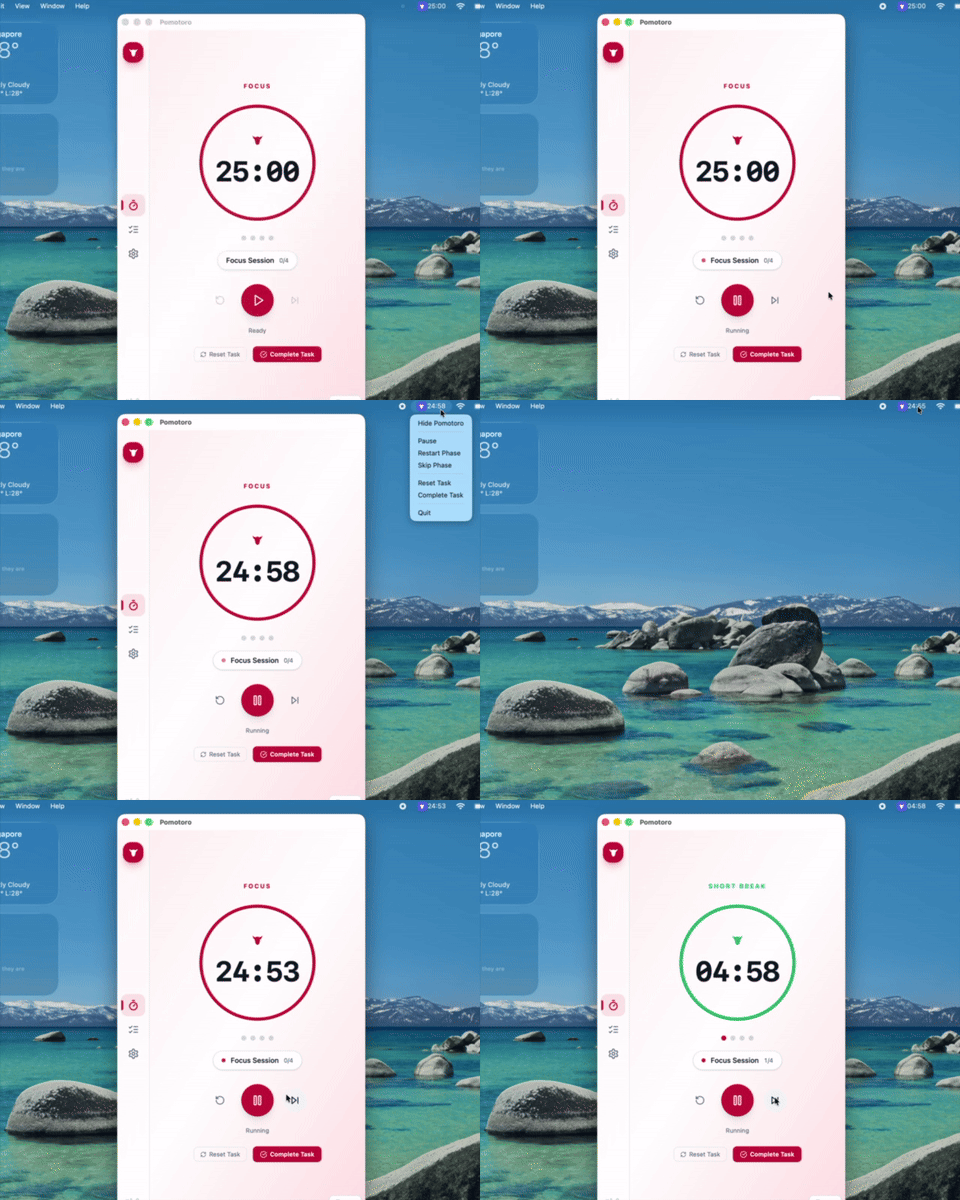
Configurable focus and break cycles with a smooth ring and session dots.
-
Task management
Multi-session tasks with tags, search, and live progress.
-
Focus audio
Rain, forest, ocean, white noise, café, fireplace, thunderstorm, brown noise.
-
Smart notifications
Desktop and sound alerts with position and auto-dismiss control.
-
Screen blocker
A full-screen overlay that actually forces you to take your break.
-
System tray
Minimize to tray with the live countdown baked into the icon.
-
Keyboard shortcuts
Cycle tasks instantly with Ctrl/Meta+Tab. No mouse needed.
-
Deeply configurable
Timer, automation, audio, appearance, window, and blocking settings.
-
Native speed
Tauri + Rust core with SQLite persistence. Minimal resources, instant response.
-
Cross-platform
Windows, macOS, and Linux. The same app everywhere you work.
How it works
Three steps from install to flow.
-
Start
Hit play. A default focus session is ready out of the box — no setup, no sign-in.
-
Add tasks
Quick-add a task, or open the detail modal for tags, descriptions, and a custom session count.
-
Focus
Pick a task, hit play, and let ambient audio keep you in flow. Cycle tasks with Ctrl/Meta+Tab.
Built for the way you focus
From deep work to daily habits — Pomotoro adapts to your workflow.
-
Deep work
Developers, writers, and designers blocking out uninterrupted time for hard problems.
-
Students & study sprints
Exam prep, problem sets, and thesis writing with a task queue per subject.
-
Daily habit building
Stack focus blocks into a morning routine — write, read, review — and lock them in with the screen blocker.
-
ADHD & focus support
External structure, a visible countdown, ambient audio, and enforced breaks to reduce context-switching.
-
Freelancers & consultants
Track billable focus time per client and project with tags and task breakdowns.
-
Remote & hybrid workers
Defend focus blocks between meetings and beat fragmentation across the day.
Why Pomotoro?
Built to be the focus tool I wanted and couldn't find.
-
Native
Tauri + Rust, not Electron. Tiny footprint, instant response.
-
Private
Everything runs locally. Your data never leaves your machine.
-
Free
MIT-licensed open source. No freemium tiers, no upsells, no tracking.
-
Yours
Hack on it, learn from it, bend it to your workflow. It's yours.
What's coming
Pomotoro is actively developed. A peek at the roadmap:
-
Statistics
Session timelines, streaks, per-task and per-tag breakdowns, charts, and export.
-
CLI
Drive Pomotoro from the terminal: status, timer control, tasks, and config.
-
Command hooks
Run shell commands on lifecycle events with templated arguments.
-
Mobile apps
Native Android & iOS with sync, lock-screen widgets, Live Activities, and offline-first timers.
-
Cloud sync
Optional end-to-end-encrypted sync so tasks, sessions, and settings follow you across devices.